
The 3 AM Database Emergency
It’s 3 AM and you’re staring at phpMyAdmin, watching query response times tick upward like a taxi meter in rush hour traffic. A client’s WooCommerce store — the one that was running perfectly fine two weeks ago — has slowed to a crawl. The admin panel takes eleven seconds to load product pages. Customers are abandoning carts because checkout feels like it’s running on a 2004 dial-up connection.
What changed two weeks ago? You added the fourth language.
You open the database and there it is: the wp_icl_translations table sitting at 80,000 rows. For a store with about 4,000 products. The translation linking tables have ballooned past the actual product tables. Every single admin page load fires dozens of JOIN queries across these tables, and with four languages active, the multiplication is brutal.
So you do what any experienced developer does at 3 AM. You start Googling. “WPML slow WooCommerce.” The results are… validating, in the worst possible way. Forum threads going back years. Other developers reporting identical symptoms. The same suggestions recycled over and over: add Redis, increase server memory, disable string translations you don’t need.
We know this story because we’ve lived it. Multiple times. With multiple clients. And after the third or fourth time we found ourselves writing custom query optimizations to patch around the same fundamental problem, we started asking a different question. Not “how do we make this faster?” but “why is this slow in the first place?”
The answer led us to build RosettaPress. But before we get there, it’s worth understanding what’s actually happening under the hood of most multilingual WordPress plugins — because the problem is architectural, and no amount of server upgrades will fix architecture.
The Dirty Secret of Multilingual WordPress
Here’s how the majority of multilingual plugins work. You have your WordPress database — wp_posts, wp_postmeta, wp_options, the usual suspects. When you install a translation plugin, it needs somewhere to store the translated versions of your content. The most common approach? Cram it all into the same database.
WPML creates its own set of tables — wp_icl_translations, wp_icl_strings, wp_icl_string_translations, and several more. Every piece of content gets entries in these tables linking the original to each translation. Polylang takes a slightly different approach, using WordPress taxonomies to manage language relationships, which is lighter on the database but still means everything lives in the same pool.
Now do the math. Say you have a WooCommerce store with 2,000 products. Each product has metadata — prices, SKUs, stock levels, attributes, variations. A single WooCommerce product can easily generate 40-60 rows across wp_posts and wp_postmeta. With one language, that’s manageable. WordPress was designed for this.
Add five languages.
Suddenly those 2,000 products have spawned 10,000 post entries. The postmeta table, already the largest table in most WordPress installs, has grown by a factor of five. And on top of that, you’ve got the translation linking tables tracking how every single row relates to its counterparts in other languages.
But the row count isn’t even the real killer. It’s the queries. Every time WordPress loads a page, the translation plugin hooks into the query pipeline. It adds JOINs. It filters by language. It looks up translation relationships. For a simple product listing page that might normally run 30 queries, you’re now running 80-120, many of them joining across large tables.
WPML’s own community forums contain threads with titles like “WPML extremely slowing WooCommerce” and “database bloat after adding languages.” Their development team acknowledged bloat issues during the 4.9 sprint planning. This isn’t hearsay — it’s documented by their own users and partially acknowledged by their own team.
To be fair, these plugins weren’t built by amateurs. WPML in particular has been around for over a decade and supports an enormous range of use cases. The single-database approach made sense when WordPress sites had a few hundred posts and “multilingual” meant two languages. But the web has changed. WooCommerce stores now routinely have tens of thousands of products. Businesses operate in eight, ten, fifteen languages. The architecture hasn’t kept up with the demands.
And that’s a structural problem. You can’t optimize your way out of a table with 300,000 rows that gets JOINed on every page load. Not really.
What If Each Language Had Its Own WordPress?
WordPress Multisite has been part of WordPress core since version 3.0, released in 2010. It allows you to run multiple WordPress sites from a single installation, each with its own database tables, its own content, its own configuration. The sites share the same WordPress codebase and plugins, but their data is completely separate.
Think about what that means for multilingual.
English site: its own wp_posts, its own wp_postmeta, its own queries. German site: same thing, totally separate tables. French, Spanish, Japanese — each one a clean WordPress install running exactly the way WordPress was designed to run.
No translation tables. No JOINs across language boundaries. No metadata bloat. Every single site in the network operates at native WordPress speed because, as far as the database is concerned, it is a normal WordPress site.
Your 2,000-product WooCommerce store with five languages? Instead of one database choking on 10,000+ product entries plus translation linking tables, you have five databases each containing 2,000 products. Each one running clean, fast, unaware of the others at the query level.
This is what RosettaPress does.
We built RosettaPress on top of WordPress Multisite because it’s the architecturally correct solution to multilingual WordPress. Not a workaround. Not a hack. The actual right way to separate content by language while keeping everything synchronized and manageable.
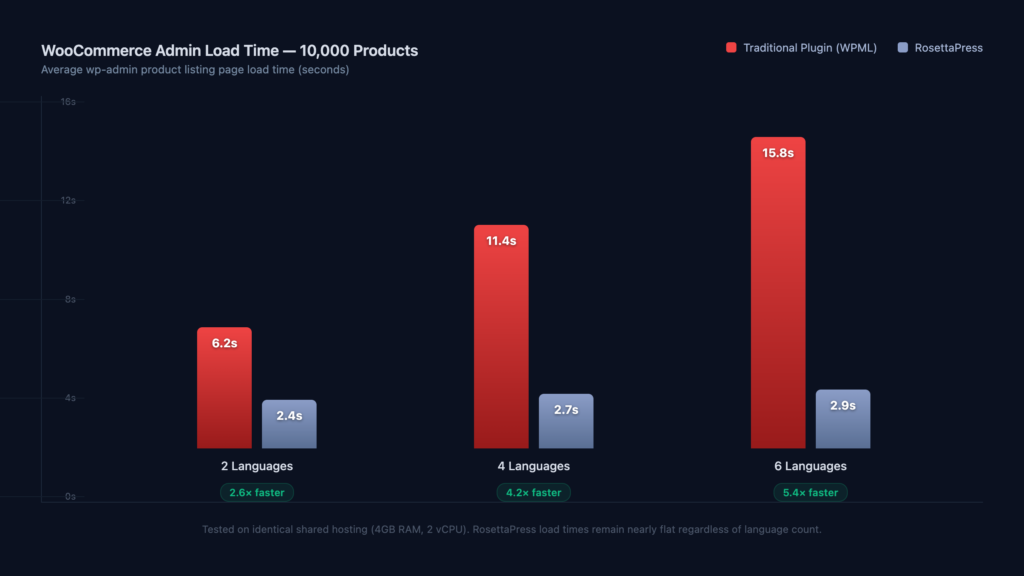
The result? Sites running RosettaPress are up to 5x faster than the same sites using single-database multilingual plugins. Not because we wrote some magical query optimizer. Because each language site simply has less work to do. Fewer rows. Simpler queries. WordPress doing what WordPress does best.
How RosettaPress Actually Works
The first thing people ask is: “Doesn’t managing five separate WordPress sites sound like a nightmare?” Fair question. It would be — if we hadn’t spent the past two years making sure it doesn’t feel that way.
When you install RosettaPress, the setup process takes about ten minutes. The plugin converts your existing single-site WordPress into a multisite network, creates subsites for each language you configure, and handles all the technical plumbing that makes multisite work. You don’t need to edit wp-config.php or mess with .htaccess rules. RosettaPress handles it.
Language groups let you organize your sites logically. Maybe you have a European group (English, German, French, Italian) and an Asian group (Japanese, Korean, Chinese). Groups help you manage translation workflows and content synchronization without drowning in a flat list of fifteen languages.
Automatic cloning is where things get interesting. When you publish a new post or product on your primary language site, RosettaPress can automatically clone it to your other language sites. The content structure, metadata, custom fields, page builder layouts — all of it gets replicated. From there, you translate the text while the structure stays intact.
Content synchronization keeps things in sync after the initial clone. Update a product price on the English site, and it propagates. Change an inventory count, and every language site reflects it. You control what syncs and what doesn’t — because sometimes the German site genuinely needs different pricing.
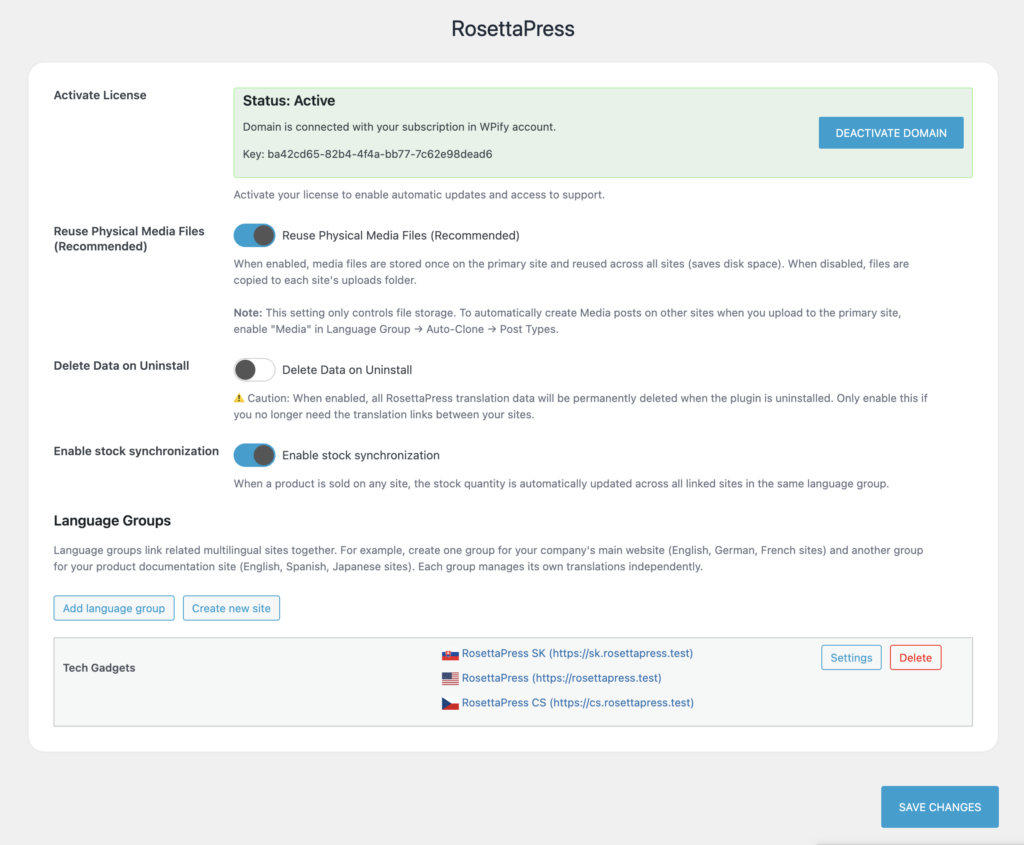
The shared media library means you upload an image once and it’s available across all language sites. No duplicating files, no wasted storage, no confusion about which version of a product photo is the current one.
And for page builder users — we know this matters — RosettaPress works with Elementor, Bricks, Breakdance, Gutenberg, Divi, and Beaver Builder. Your layouts clone correctly. Your builder-specific settings transfer. We tested extensively with each one because “page builder compatible” means nothing if the translated page comes out broken.
The experience from the admin side feels like managing one site with a language switcher, not five separate sites with separate logins. That was non-negotiable for us during development. If it felt complicated, we hadn’t finished building it.
WooCommerce Without the Multilingual Tax
Let’s talk about the use case that actually pushed us to build this: large WooCommerce stores.
We work with e-commerce clients daily at WPify. We’ve seen what happens when a store with 50,000 products installs a single-database multilingual plugin and adds four languages. The math is simple and brutal — that database now manages the equivalent of 200,000+ products’ worth of data in a single set of tables, plus all the translation metadata on top. Admin pages that loaded in two seconds now take fifteen. Bulk editing becomes an exercise in patience. WooCommerce’s already-heavy queries buckle under the added JOINs.
With RosettaPress, that 50,000-product store stays a 50,000-product store. Each language site contains only its own products, running WooCommerce queries against a reasonably sized database. The backend stays responsive. Bulk edits work as expected. WooCommerce analytics and reporting run against clean data without translation overhead.
Product synchronization handles the complexity of keeping multilingual WooCommerce coherent. Inventory levels sync across all language sites in real time — sell a product on the French site, and the German site’s stock count updates. Price synchronization works the same way, with the flexibility to set per-language pricing when markets demand it. The multilingual checkout experience is native to each language site, so you’re not running checkout through translation filters that add latency at the worst possible moment.
One of our early beta testers, an agency managing a mid-size European fashion retailer, reported that their client’s WooCommerce admin load time dropped from 12 seconds to under 3 after migrating from WPML to RosettaPress. The client’s exact words were something like, “It feels like a different website.” It wasn’t. It was the same website with a fundamentally better architecture underneath.
Automatic Translation That Actually Saves Time
Translation is expensive. Professional human translation runs $0.10-0.20 per word, and a 5,000-product WooCommerce store has a lot of words. Machine translation has gotten remarkably good — especially DeepL, which handles European languages with near-human quality in many cases.
RosettaPress integrates with both DeepL and Google Translate directly. You can auto-translate individual pages, entire content types, or use bulk translation to process hundreds of items at once. The workflow looks like this: you publish content on your primary site, RosettaPress clones it to your language sites, automatic translation fills in the translated text, and then your team reviews and refines.
That review step matters. We’re not pretending machine translation is perfect. But it’s an extraordinary starting point. What used to be “write translations from scratch” becomes “review and polish machine-translated drafts.” For a 1,000-word blog post, that’s the difference between two hours of translator time and twenty minutes of editor time.
ChatGPT integration for translations is also in the works. Large language models handle nuance, brand voice, and context differently than traditional machine translation. It’s in the pipeline, and we’re genuinely excited about what it’ll mean for translation quality — particularly for marketing content where tone matters as much as accuracy.
Bulk translation is the feature that agencies tell us they care about most. Migrating a 200-page site into four new languages shouldn’t take weeks of clicking “translate” on individual pages. Select the content, pick the languages, hit go. RosettaPress handles the queue.
SEO Done Right
Multilingual SEO gets screwed up constantly. We’ve audited sites where hreflang tags pointed to the wrong language versions, where translated pages had duplicate content issues because the slugs weren’t translated, where Google couldn’t find the language-specific sitemaps.
Correct hreflang tags are generated automatically — because each language is a separate site with a clear URL structure. Per-language sitemaps are generated independently for each site. Slugs are translated, so your German product page lives at /de/produkte/rotes-kleid/ instead of /de/products/red-dress/. Clean, logical, exactly what search engines expect.
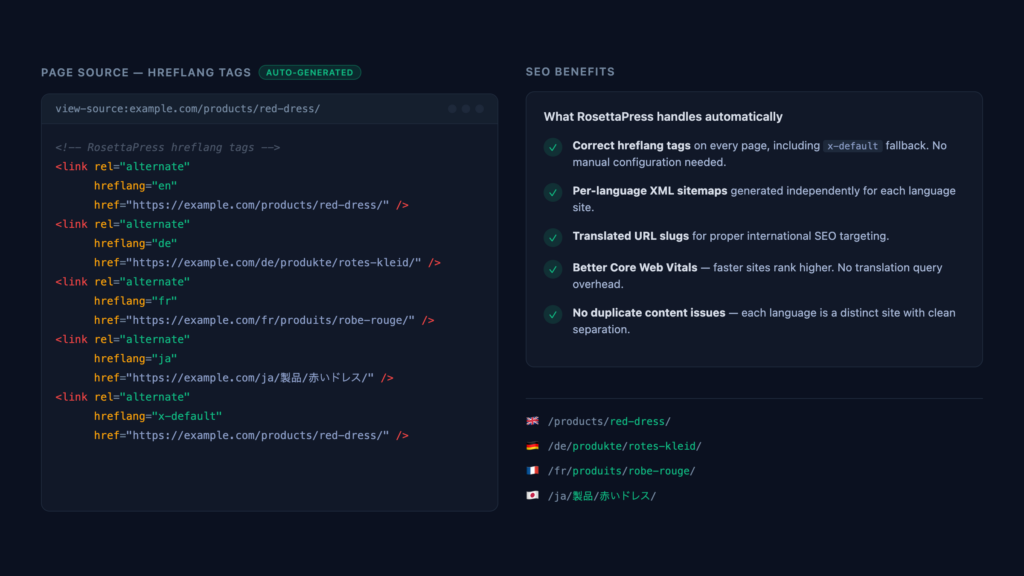
There’s a subtler advantage here too. Google evaluates page speed as a ranking factor. When your multilingual site runs at native WordPress speed instead of being weighed down by translation query overhead, every language version benefits from better Core Web Vitals scores. Five fast sites will outrank one slow site serving five languages through query filters. That’s not opinion — that’s how Google’s ranking algorithms work.
“But Isn’t Multisite Complicated?”
Okay, let’s address the elephant directly.
WordPress Multisite has a reputation. Some of it is earned — early multisite was rough around the edges, plugin compatibility was spotty, and managing networks required genuine sysadmin knowledge. Some of that reputation is outdated by a decade. And some of it, honestly, comes from people using multisite for things it wasn’t meant for.
Here’s our opinion, and we hold it strongly: multisite’s bad reputation mostly comes from people using it wrong. Using multisite to run fifteen completely unrelated websites on one installation? That’s asking for trouble. Using multisite to run fifteen language versions of the same website, sharing the same themes, plugins, and media? That’s exactly what it was designed for.
RosettaPress abstracts away the multisite complexity entirely. You don’t manage individual sites. You manage languages. The admin experience is unified — one dashboard, one place to manage content, one interface that shows you all your languages and their sync status. Language groups mean you can think in terms of “European languages” and “Asian languages” instead of tracking individual subsites.
Adding a new language takes minutes. RosettaPress creates the subsite, applies your theme and settings, and you’re ready to start translating. Removing a language is just as clean — the subsite and its data go away without affecting anything else. Try doing that with a single-database plugin without leaving orphaned translation rows behind.
It works for two languages. It works for twenty. The performance characteristics actually improve relative to single-database plugins as you add more languages, because each new language is just another lightweight WordPress site, not another multiplier on your existing database’s query load.
If you’re an agency managing multilingual sites for clients, multisite also gives you something single-database plugins can’t: genuine isolation. A broken translation import on the Spanish site can’t corrupt your English content. A runaway plugin conflict on one language site doesn’t take down the others. Each site is a containment boundary.
Pricing That Makes Sense
We kept the pricing simple.
Standard — €99/year. One multisite network, all features, all integrations. This is your single client with one multilingual website.
Pro — €199/year. Up to five multisite networks. For freelancers and small agencies managing a handful of multilingual projects.
Agency — €399/year. Up to 100 websites. For agencies where multilingual is a core part of the business.
Every plan includes the 14-day free trial. Install it, set it up, run your own benchmarks. If the speed difference doesn’t convince you, we’ll part as friends.
For context, WPML’s CMS plan (which you need for WooCommerce) runs at comparable annual pricing. Polylang Pro with WooCommerce support is in the same range. We’re not undercutting on price — we’re competing on what you actually get for that price. Specifically: a multilingual site that stays fast as it grows, instead of one that slows down with every language you add.
All plans come with a money-back guarantee. We’re confident enough in the performance difference that we want you to test it risk-free.
Your Database Will Thank You
Honestly, we built RosettaPress because we got tired of solving the same problem with band-aids. Tired of writing custom query optimizations for clients whose sites shouldn’t have been slow in the first place. Tired of recommending server upgrades to compensate for architectural choices made by someone else’s plugin.
The WordPress multilingual space has been stuck in the same paradigm for over a decade. Same database, same bloat, same performance degradation, same cycle of caching layers and hardware upgrades. We think there’s a better way, and we built it.
RosettaPress gives every language its own clean WordPress site, keeps everything synchronized behind a unified admin interface, and runs up to 5x faster than the plugins you’re probably using right now. It works with WooCommerce, with every major page builder, and with the translation APIs that actually produce usable output.
Start your 14-day free trial at rosettapress.com and see the difference for yourself. Setup takes ten minutes. Your first benchmark will take less.
Your database has been working overtime. Give it a break.